Why we built Redlyn, a visual website feedback tool
How Crayont built Redlyn, a visual website feedback tool: the problem, the two-link idea, the Cloudflare stack, what shipped and how to try it free.

- Published
- Reading time
- 7 min
TL;DR · Key takeaways
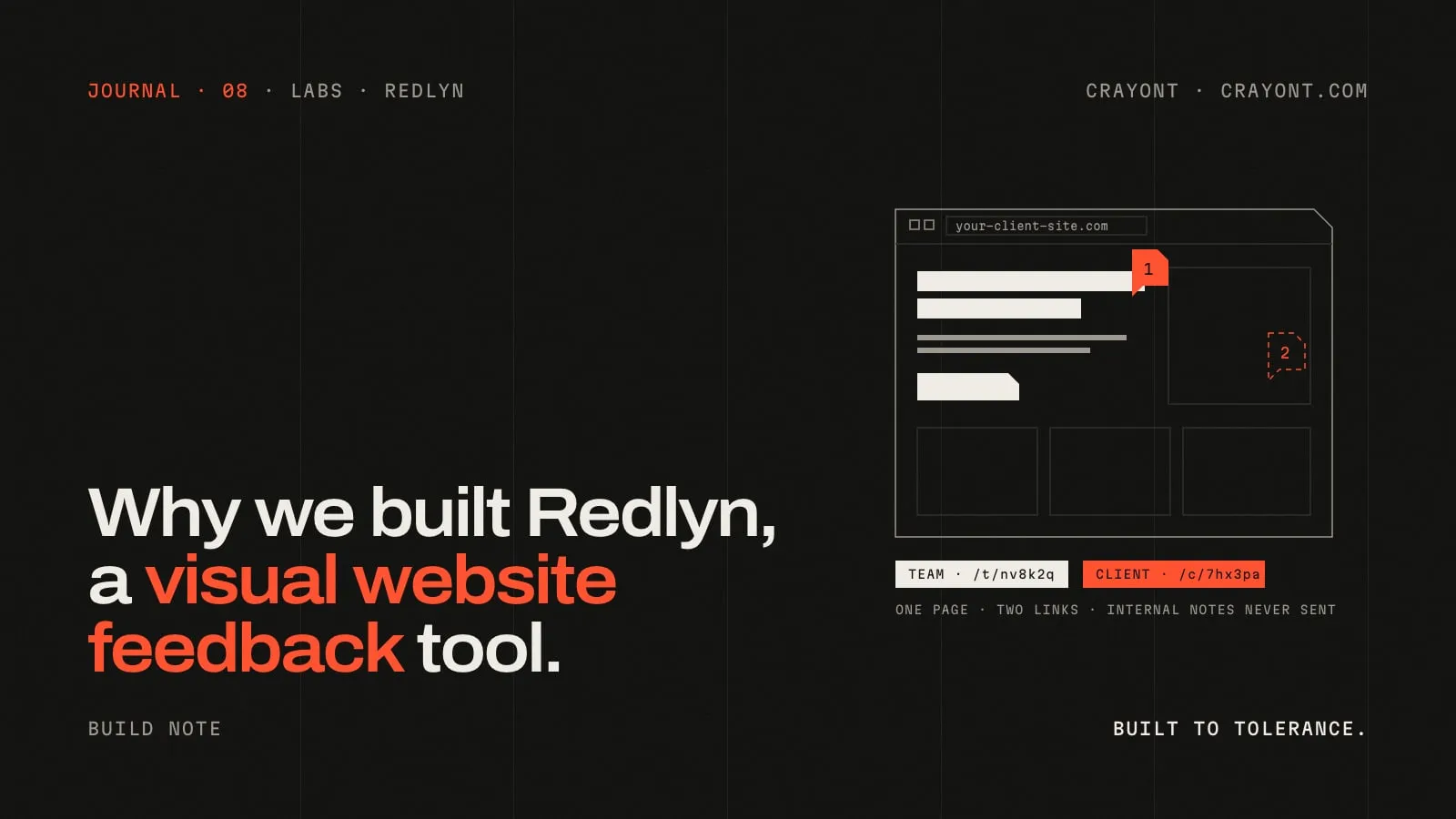
- Redlyn is a visual website feedback tool. Paste a website link and you get two: a team link that sees everything, and a client link that needs no account.
- We built it for our own client work first, because feedback arrived scattered across WhatsApp, email and calls, without the element, the screen size or the browser.
- It runs on Cloudflare: a React app on Pages, a Hono API with a D1 database, and a separate proxy Worker that loads the client's site and adds the pin layer.
- Internal comments are filtered in the database query for client links and covered by automated tests. Redlyn is free for one website.
Redlyn is one of the products we build in Crayont Labs. It’s a visual website feedback tool: paste a website link and you get two, one for your team and one for your client, on the exact same page.
This is the story of why we built it, how it works, and what shipped in its first ten days.
The problem with website feedback on WhatsApp and email
We build websites for clients. Every project ends with a review round, and for us that round used to look the same every time: feedback scattered across WhatsApp, email and calls, with nobody quite sure what had been approved.
“The thing in the 2nd section?” “Which button?” A file called Screenshot (12). Each message is reasonable on its own. Together they leave out everything a designer or developer needs to act on them.
- No exact spot. Which element, on which page?
- No context. Which screen size, which browser?
- No separation. Our own discussion about a fix sat in the same thread as the client’s requests.
- No record. When the client said “looks good”, it was buried somewhere in the chat.
Half the work of a review was working out what the client meant. The other half was making sure nothing got lost.
Where the idea for Redlyn came from
We needed a way to collect client feedback directly on live websites, the way tools like MarkUp.io do: open the site, click on the thing you mean, type the comment. That part was not new.
What we wanted on top was simple to say and missing from what we’d seen. Most tools mix team and client feedback. We wanted our team to talk privately next to the client’s comments, on the same page, without the client ever seeing it, and without a second tool.
So we decided to build it ourselves, for Crayont’s own client work first. From the first day it was designed as a product other agencies could use too: every agency gets its own workspace, and Crayont is simply workspace number one. Building for ourselves first had a practical upside. Even with zero customers, it would be useful to us.
The name came last. Redlyn comes from redline: the marked-up corrections designers and editors put on a piece of work. We chose it on 27 September 2026, from a shortlist that included Tippani, Laal Rekha, Remarko and Pintora.
One page, two links: how visual website feedback should work
Here is the whole idea, start to finish:
- Paste a website link. A live site or a staging link. No code to add, no plugin.
- Get two links. A team link for workspace members, and a client link that needs no account.
- Click anywhere to comment. The comment is pinned to the exact element on the live page.
- Resolve and get sign-off. Mark a fix “In review”; the client confirms it and approves the page.
Both links show the same page and the same pins. The difference is who sees what. The team link sees everything, including internal comments. The client link sees client comments only, can reply, and can approve the page. Internal comments are filtered on the server, so they never reach the client’s browser at all.
That one rule is the point of the product. We can write “fix is in staging, don’t share the ETA yet” right next to the client’s request, and the client sees a calm, clean page.
What every pin remembers
A vague comment is only a problem when the context is missing. So every pin in Redlyn saves its own context:
- A screenshot, attached automatically: exactly what the reviewer saw, at their scroll position and screen size, with the pin marked on it.
- The element, the browser and the screen size, so a developer never has to ask.
- A voice note, if typing isn’t enough: up to 90 seconds, for clients and for the team.
- Its screen group. Desktop, tablet and phone each get their own pins, so feedback for one layout never clutters another.
A few details matter more than they sound. Press ↑ or ↓ to select the parent or child element, so a client can pin a whole card instead of the text inside it. A comment made inside the third tab of a tabbed section re-opens that tab when someone clicks it. And it works on animated, GSAP-heavy sites, because a lot of what we build moves.
How Redlyn is built: Cloudflare Workers, D1 and a proxy
The hardest part of a tool like this is not the comments. It’s showing someone else’s website inside your app, fully working, with a commenting layer on top. That’s a proxy, and the proxy decided the stack.
We chose Cloudflare for the whole product, because it is good at exactly the thing Redlyn does most: fetching and serving other people’s pages, without bandwidth fees, with everything in one place. The pieces:
- The app: React, hosted on Cloudflare Pages. The dashboard, the review workspace and the client view.
- The API: Hono, running on Cloudflare Pages Functions, with D1 (Cloudflare’s SQLite database) for workspaces, pages, comments and approvals.
- The proxy: a separate Cloudflare Worker that loads the client’s website, rewrites its links so they go through the proxy, and injects the pin layer. It has no database access.
- The pin script: bundled into the proxy, running inside the reviewed site. It handles element picking, pins and tab memory.
The proxy has limits, and we’d rather say so. Pages that need a login, and some very complex web apps, may not load inside the preview. When that happens, Redlyn shows a clear message instead of a broken page.
The security choices behind it
A feedback tool sits between an agency and its clients, so the rules that protect that line are written into the code, not left to settings:
- Internal means internal. For client requests, internal comments are filtered in the SQL query itself, and an end-to-end security test checks it.
- Comments are typed in Redlyn, not in the client’s site. Analytics or session-recording scripts on the reviewed site can’t read what the team writes.
- Two origins. The proxy runs on a different origin from the app, so the reviewed site’s code can’t touch your Redlyn session.
- A narrow proxy. It only loads pages from the project’s own site, refuses sign-in and payment pages, and has daily caps and a kill switch.
- Links you control. Client links can expire, can require an email, and can be revoked instantly.
What shipped, and when
The first release went out on 27 September 2026. These dates come from the project’s own commit history:
| Date | What shipped |
|---|---|
| 27 Sept 2026 | First release: a team link and a client link on the same live page, with pinned comments, deployed on Cloudflare |
| 28 Sept 2026 | Screenshots on every pin, image paste, keyboard shortcuts, dark mode, and the public landing page |
| 30 Sept 2026 | The move to redlyn.in, privacy and terms pages, paid plans by card or UPI, pins grouped by desktop, tablet and phone, and voice notes on comments and replies |
| 6 Oct 2026 | Faster reviewing: shortcuts everywhere, instant pins, editable comments, pin previews on hover, and adding teammates from the share window |
We use it on our own client reviews, and it’s now open to every agency and freelancer.
What’s next for Redlyn
The original plan still guides the order of work. Next on the list:
- Email notifications for new comments, mentions and approvals.
- Image, PDF and video review, with timestamped comments on video.
- Real-time updates, so new pins appear for everyone at once.
- Later: an AI summary that turns scattered comments into a grouped task list, versions for re-reviewing after changes, and exports to tools like Slack and ClickUp.
Those are plans, not promises with dates. The Redlyn page in Labs keeps the changelog of what has actually shipped.
Try Redlyn free
If you build websites for clients, try it on your next review round. It’s free for one website, there’s no card to add, and your client doesn’t need an account. Paid plans start at ₹499 a month when you need more websites.
Redlyn is also an example of the kind of product we build for others. If you need a web app with real users, real data and security rules that can’t be skipped, that’s our web app development service. Send us the brief, and you’ll get a reply within one working day.
Mohammed Riyaz, Founder
Questions people ask
- What is Redlyn?
- Redlyn is a visual website feedback tool for agencies and freelancers, built by Crayont. You paste a website link and get two links to the same live page: one for your team and one for your client. Everyone clicks on the page to leave a pinned comment, and every pin saves a screenshot, the element, the browser and the screen size.
- Do my clients need an account to leave feedback?
- No. Clients open the client link, type their name once and start commenting. There is nothing to install, no browser extension and no app.
- Can clients see our internal comments?
- No. Internal comments and internal replies are filtered on the server, in the database query, so they are never sent to the client's browser. That rule is covered by automated security tests.
- Do I need to add a script or plugin to the website?
- No. Redlyn loads the live or staging site through its own proxy and adds the commenting layer on top. Pages that need a login, and some very complex web apps, may not load in the preview; Redlyn shows a clear message when that happens.
- How much does Redlyn cost?
- Redlyn is free for one website, with no card needed. Paid plans start at ₹499 a month for five websites, and you can pay by card or UPI.
Keep reading
All notes →- Why I started CrayontThe founder's note: a dream from college, years of freelance and agency work, and why two brothers started a studio that designs and codes everything.
- Website development for Bengaluru startups: what to build first, and what it costsHiring a website development company in Bengaluru for a startup? What to build at each stage, marketing site vs web app, which stack to pick, what it costs and a brief you can copy.
- Redesign or fix? How to tell if your website needs a redesign, and what one costsNot every tired website needs a redesign. A simple test for redesign vs fix, the signs that mean start again, what a redesign costs and how to do one without losing rankings.