Startups7 min read
How to validate a startup idea with a landing page in 2027, from India
A two-week plan to test a startup idea with one landing page before you build: what goes on the page, how to take real deposits with UPI, how to get the first 200 visitors, what to count, and when to stop.

Quick summary
- A landing page tests one thing: will the people you picked take a real step, like paying a refundable deposit or messaging you, after reading what you offer and what it costs.
- Count actions from people you can name, not percentages. The conversion thresholds that ranking articles quote don't agree with each other and none of them cite a source.
- In India, the strongest test is a refundable deposit through a payment link, which takes UPI. Stripe is invite-only for Indian businesses, so most US-written guides don't work here as written.
- Free tools cover it: a Cloudflare-hosted page, a WhatsApp click-to-chat link, Google Search Console and Keyword Planner. Your real cost is the time to reach people.
- If you'd rather not build the page yourself, ours start at ₹12,999 with a free sample homepage first.
You don’t need to build the product to find out if people want it. You need one page that says who it’s for, what it fixes and what it costs, plus one button that asks for something real, and two weeks of sending it to the right people.
This guide is the plan we’d follow ourselves from India in 2027. It covers what goes on the page, how to take refundable deposits with UPI, how to get your first 200 visitors without ads, what to count, and when to stop.
We read the guides that rank for this topic before writing. Most are written for US founders, rely on Stripe and quote conversion targets with no source. Where we disagree with them, we say why.
Day 1 to 2
Write the page
Buyer, problem, price, one button.
Day 3
List 50 to 100 buyers
Named people who have the problem.
Day 4 to 12
Send it one by one
A message each. Note every objection.
Day 13 to 14
Count and decide
People who paid or messaged, by name.
What a landing page can and can’t tell you
A landing page answers one question: when the right people read your offer and its price, do they take a real step?
It can’t tell you whether the product will work, whether customers will stay, or how big the market is. It also can’t fix a vague idea. If you can’t say who the buyer is in one line, stop and do that first.
The step you ask for decides how much you learn:
| What you ask for | What it proves | Strength |
|---|---|---|
| Email on a waitlist | Curiosity | Weak |
| A WhatsApp message or a booked call | Enough interest to talk | Medium |
| A refundable deposit | They’ll pay | Strong |
Ask for the strongest step you honestly can.
A list of 300 emails can still mean nobody will pay.
What goes on the page
Keep it to one screen on a phone, plus a short FAQ underneath. Here is an example we made for this guide, with the seven parts marked in order:
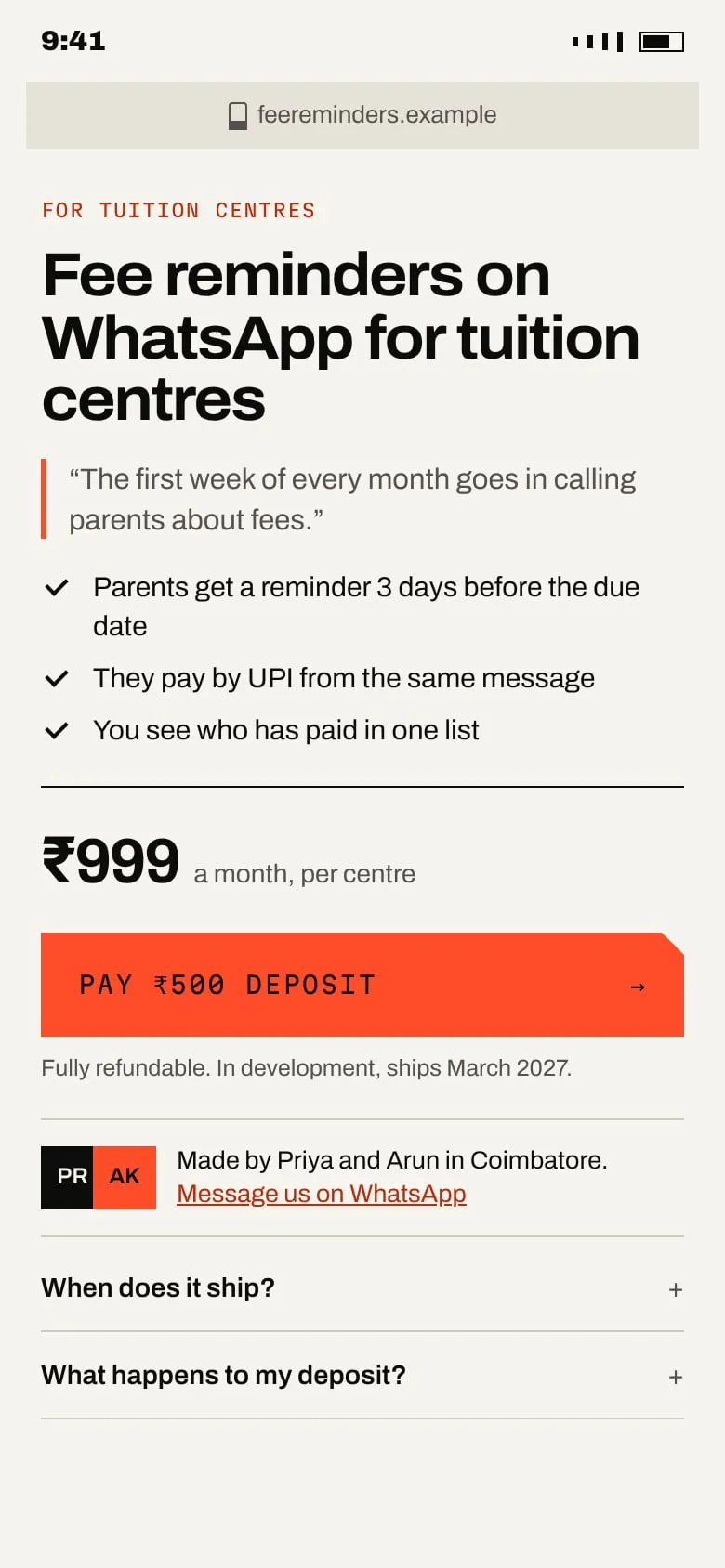
- Headline: the buyer and the result.
- The problem in their words: one or two lines they'd say themselves. Get these from conversations, not imagination.
- What they get: three bullets, concrete and checkable.
- The price: a real number. A page without a price measures interest, not demand.
- One button: pay a refundable deposit, or message us on WhatsApp. One action per page.
- Who's behind it: a name, a city and a way to reach you. Strangers don't pay a page with no people on it.
- FAQ: when it ships, what happens to the deposit, what's included.
The headline does most of the work. Name the buyer and the result:
Do
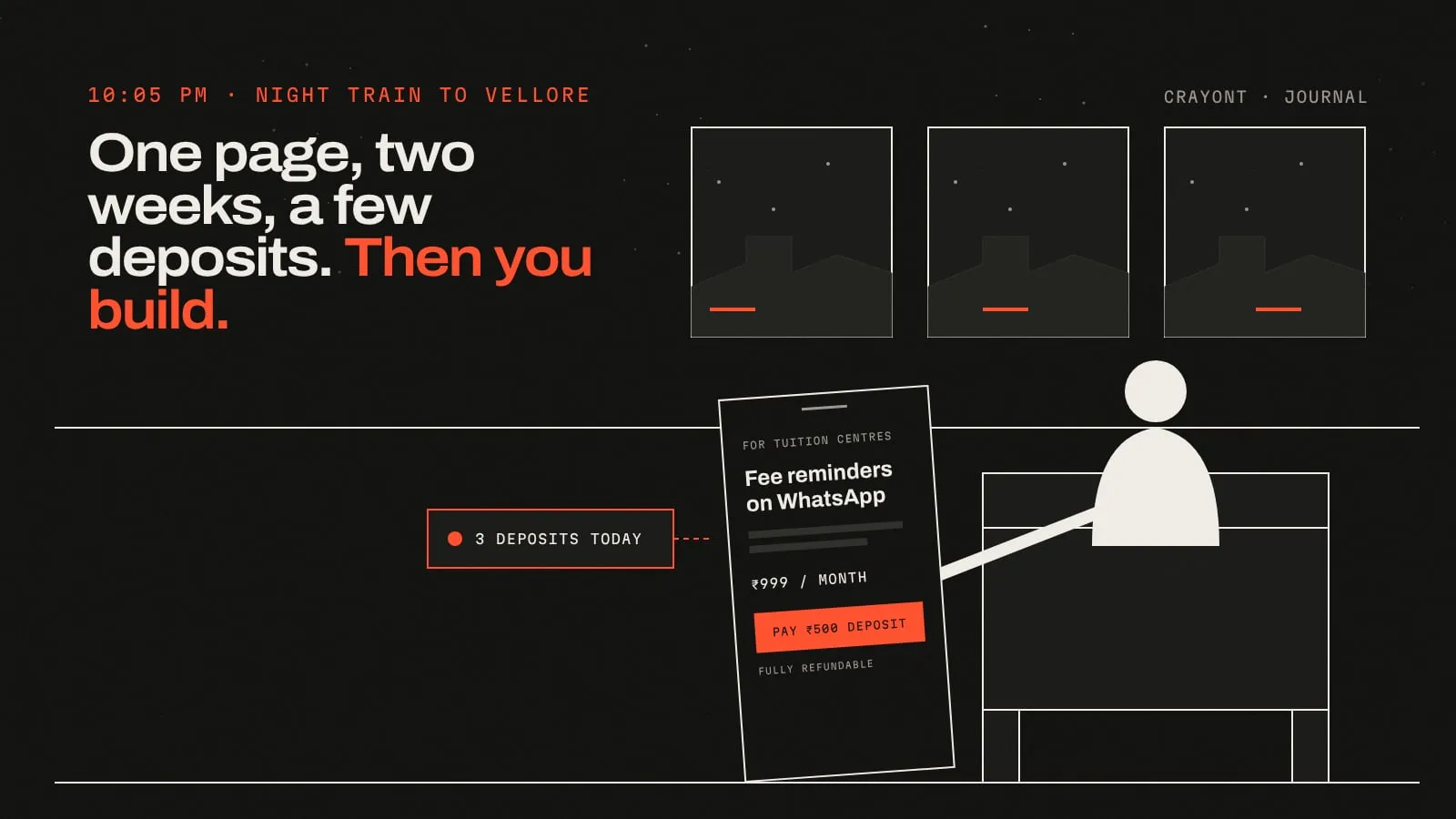
Fee reminders on WhatsApp for tuition centres
Says who it's for and what they get.
Don't
The future of education payments
Could be for anyone, about anything.
Before you send the page to anyone
- Buyer: the headline names who it's for.
- Price: a real number, on the first screen.
- One button: a deposit or a WhatsApp message, not both fighting for space.
- People: a name, a city and a way to reach you.
- Refund line: in development, the delivery date, money back on request.
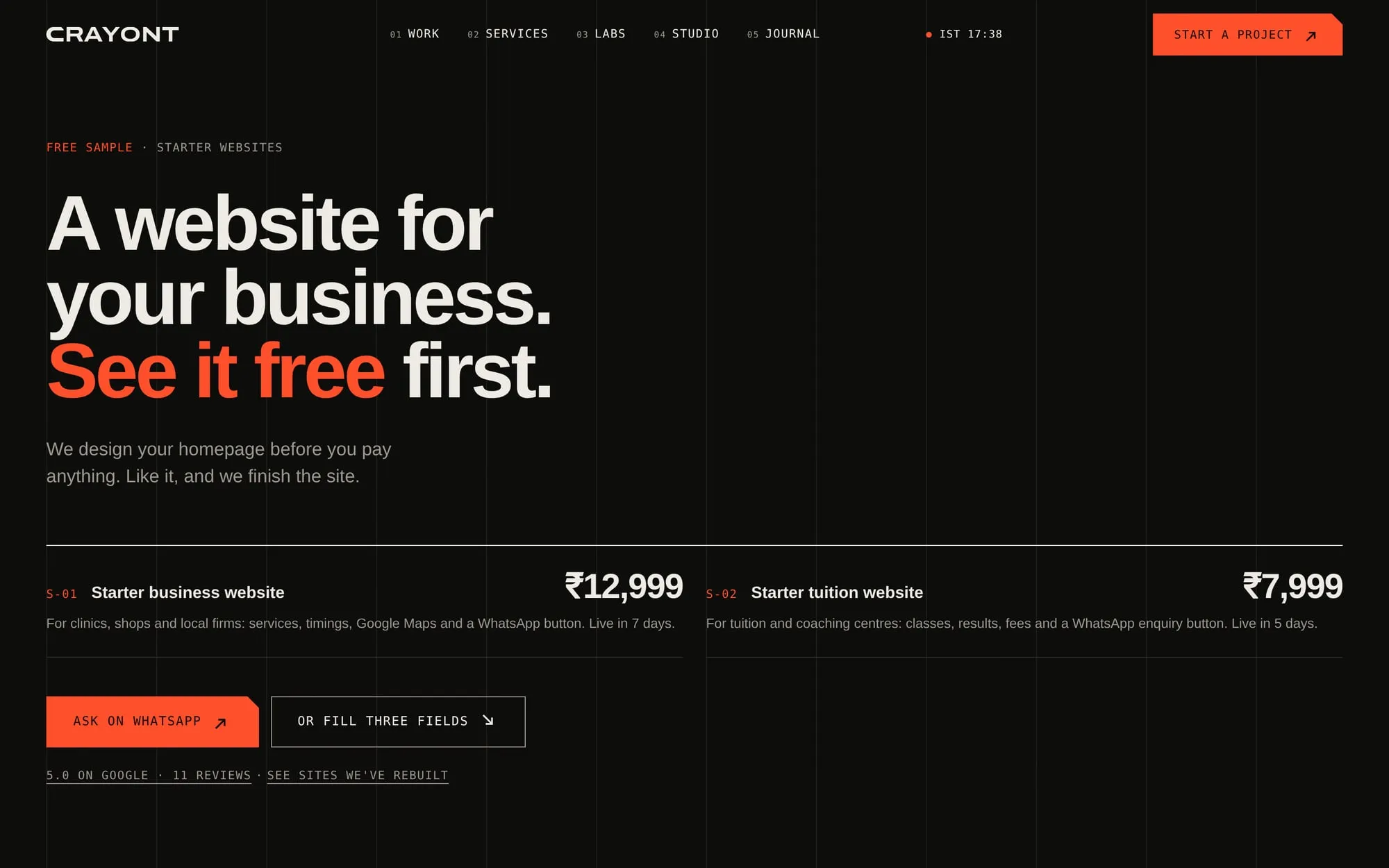
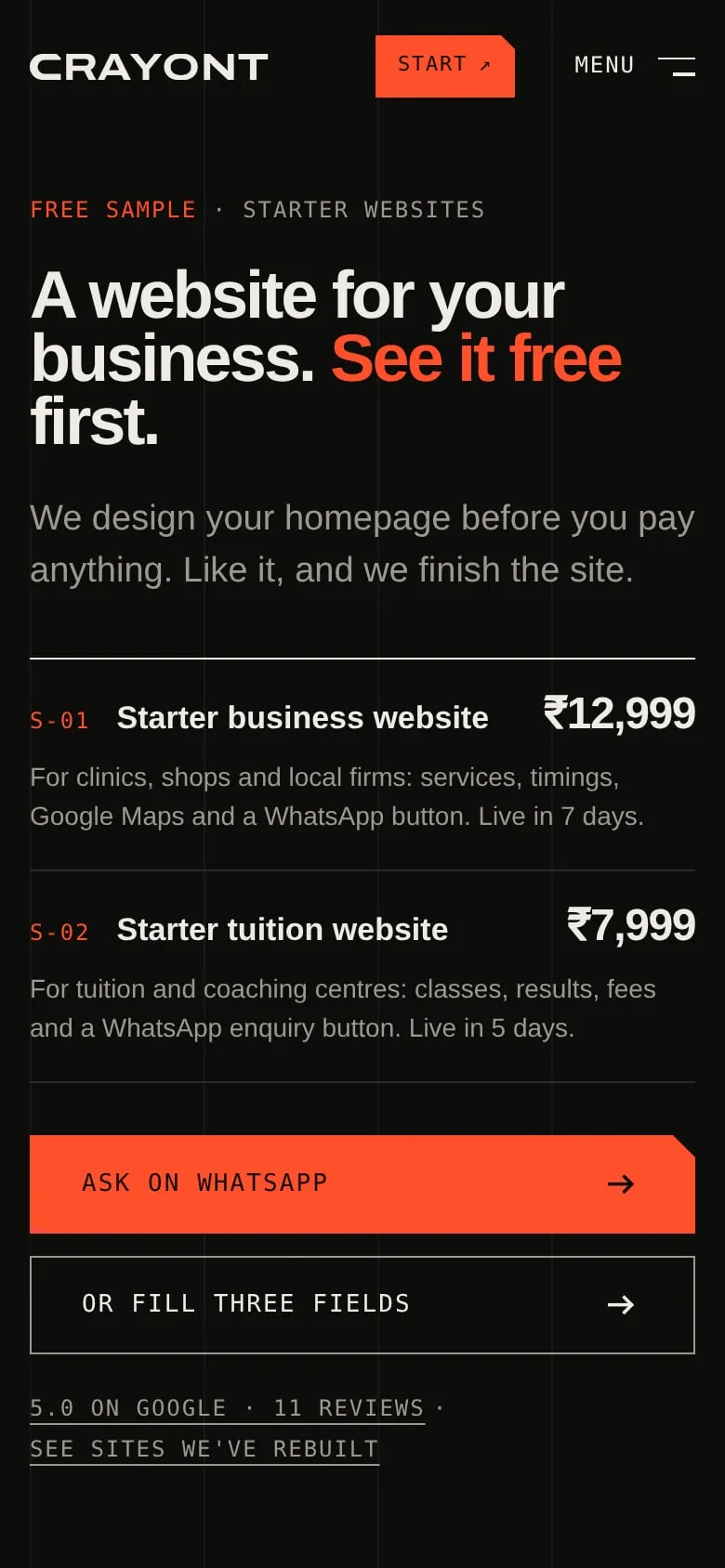
Our own offer page follows the same rules: one offer, a real price and one action.
Taking real deposits from India
Most English guides tell you to add a Stripe checkout. From India that usually won’t work: Stripe says its services are invite-only in India and new Indian businesses can’t sign up through the website.
Use an Indian payment gateway’s payment link or payment page instead. These take UPI and cards with no code. Razorpay, for example, says in its pricing guide that most domestic methods cost 2% of each successful payment, with 18% GST charged on that fee, not on the whole amount. Check the current rate on your own dashboard before you set a price.
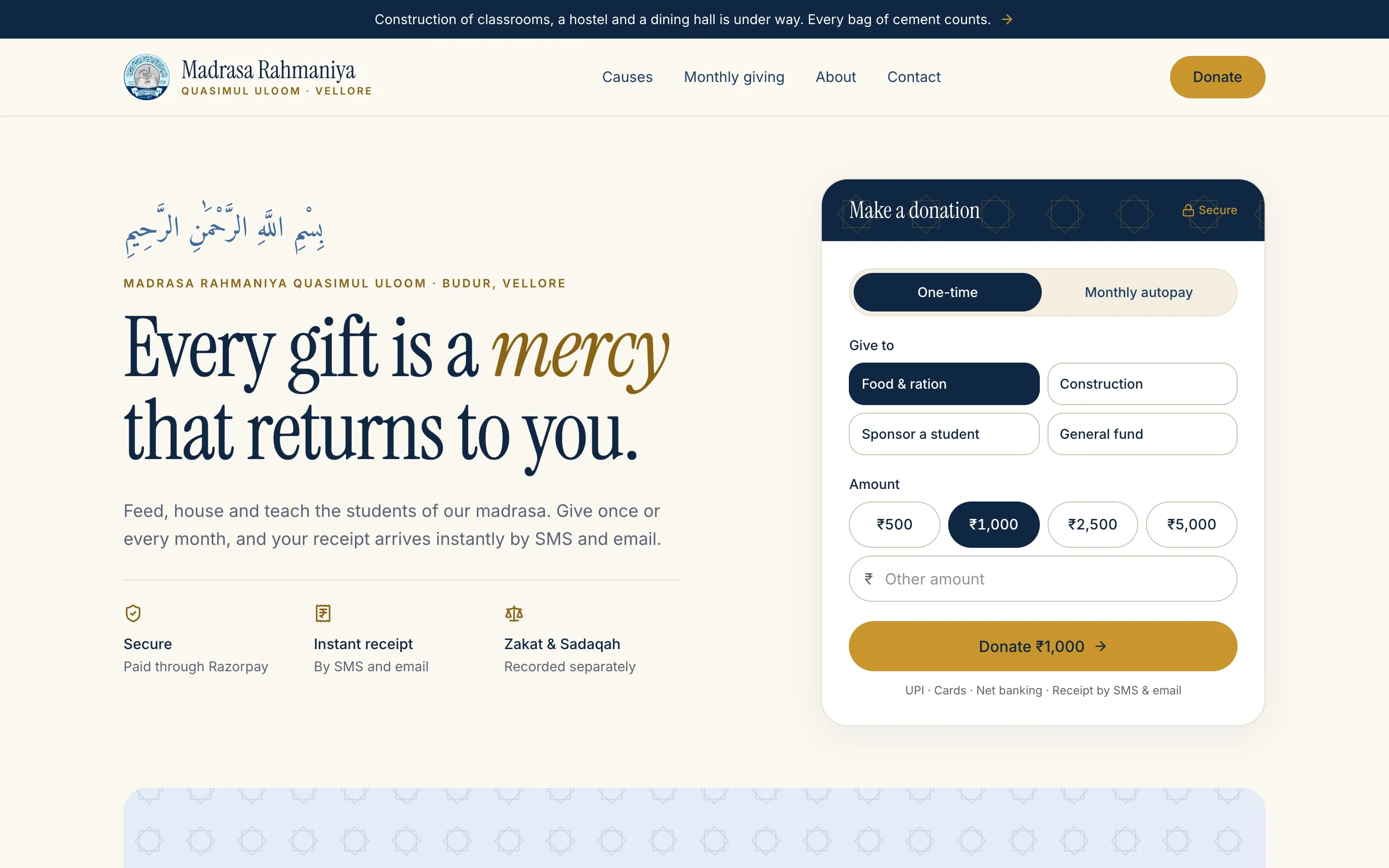
A page that takes money doesn’t have to look like a checkout. This is a donation page we built, where the amounts, the pay button and the payment methods sit on the first screen:
Keep the deposit small and honest:
- Small: enough that clicking means something, small enough that it’s an easy yes. For a ₹999/month product, ₹200 to ₹500 is a fair test.
- Honest: say on the page and in the receipt that the product is in development, when you plan to deliver, and that the deposit is fully refundable on request. Then refund anyone who asks, quickly.
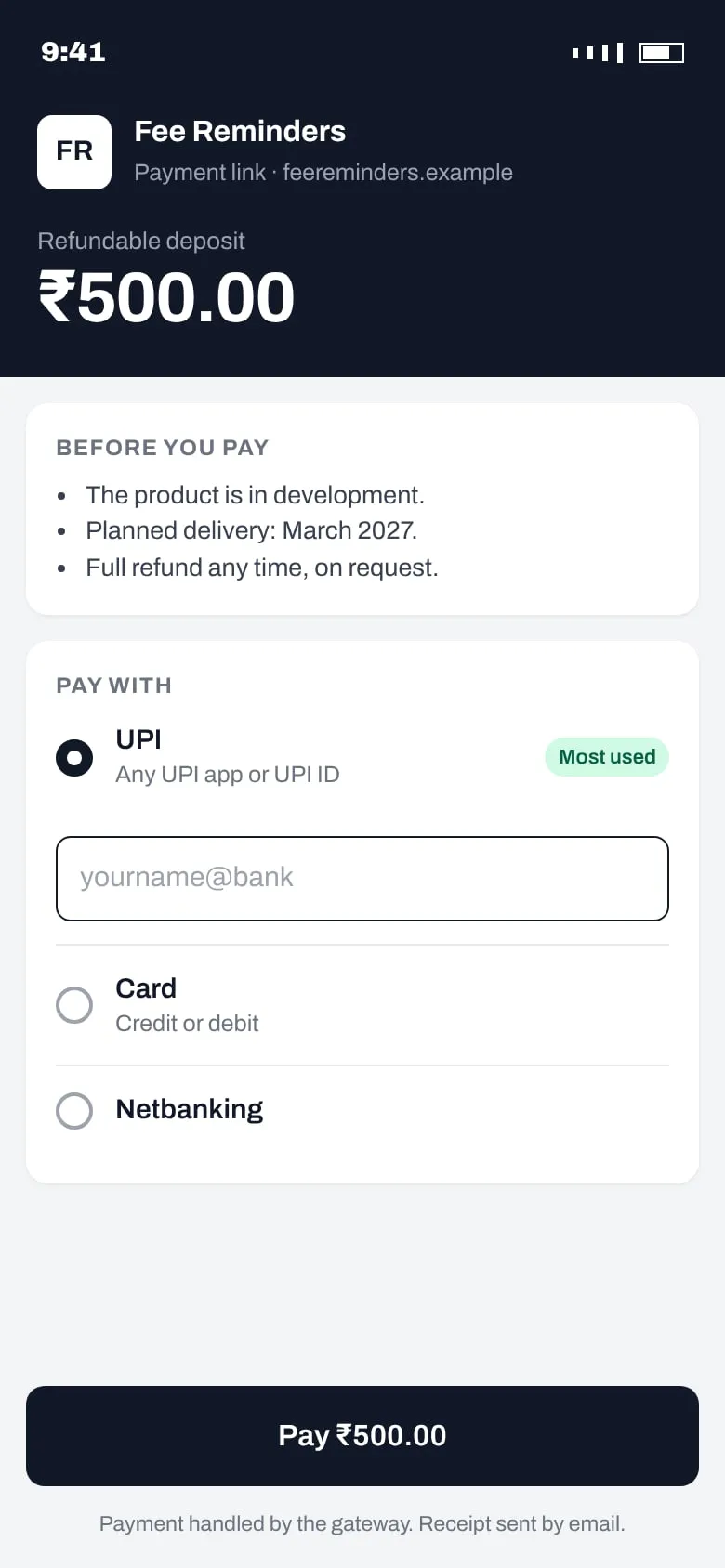
- The honest part, before they pay: in development, when you plan to deliver, full refund on request.
- UPI first. A payment link from an Indian gateway takes UPI and cards with no code.
- A small amount: an easy yes, but clicking still means something.
The WhatsApp button
For many Indian buyers, messaging is a lower barrier than a form. WhatsApp’s click-to-chat link opens a chat with your number and an optional pre-filled message. The format is the full number in international format with no zeros, brackets or dashes:
https://wa.me/91XXXXXXXXXX?text=Hi%2C%20I%20saw%20the%20fee%20reminder%20page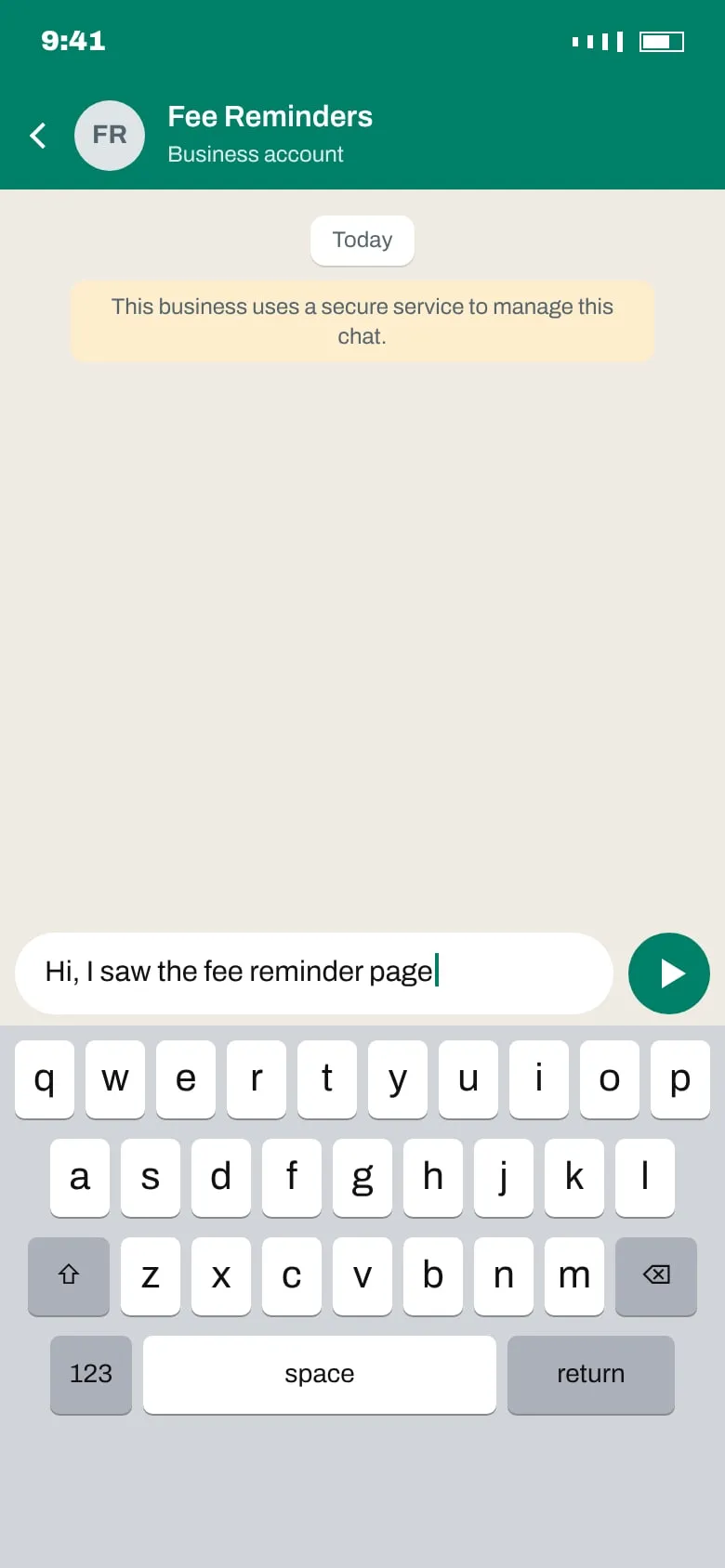
- The text from the link is already in the box. The buyer only has to press send.
- One tap sends it, and you know which page it came from.
The pre-filled text tells you which page the message came from. Use a different text on each page or each channel, and you’ll know what worked without any analytics.
Measuring without paying for tools
You don’t need a paid analytics suite for a two-week test. Count three things:
- Visits: any privacy-friendly counter, or your host’s analytics.
- Actions: deposits (your payment dashboard), WhatsApp chats (count them by hand) and calls.
- Where they came from: add
?utm_source=whatsapp,?utm_source=emailand so on to every link you share.
On our own site we count WhatsApp, call and email clicks and form sends with a small cookieless counter on Cloudflare, instead of a third-party script. It tells us which pages and which channels bring enquiries, which is all a test like this needs.
If the page should also be found in search, add it to Google Search Console, which is free. Google says data for a new site normally shows up in 2 to 3 days and can take up to a week. To see what people search for, Keyword Planner is free too, but you need to finish setting up a Google Ads account to open it, and its search volumes are estimates.
Hosting it for free
A one-page site costs almost nothing to host. Cloudflare’s Workers free plan allows 100,000 requests a day, and its Pages free plan allows 500 builds a month. That’s far more than a validation test will use. Our own site runs on Cloudflare Workers.
If you want people to join a list, the form needs somewhere to send the email. Ours is a short endpoint that runs on the same Worker and adds the address to an email list. Trimmed from this site’s code:
// src/pages/api/waitlist.ts (trimmed)
export const POST: APIRoute = async ({ request }) => {
  const data = Object.fromEntries((await request.formData()).entries());
  const email = String(data.email ?? "").trim().slice(0, 200);
  if (data.website) return json({ ok: true }); // hidden field: bots fill it, people don't
  if (!EMAIL_RE.test(email)) return json({ ok: false, errors: { email: "Add a valid email." } }, 422);
  const res = await fetch(`https://api.resend.com/audiences/${RESEND_AUDIENCE_ID}/contacts`, {
    method: "POST",
    headers: { Authorization: `Bearer ${RESEND_API_KEY}`, "Content-Type": "application/json" },
    body: JSON.stringify({ email, unsubscribed: false }),
  });
  return res.ok ? json({ ok: true }) : json({ ok: false, error: "Try again in a minute." }, 502);
};
No database, no cookie banner, and nothing to maintain after the test.
Getting the first 200 visitors without ads
Ads bring strangers. For a first test you want people who have the problem, and you can reach them directly:
- Your list of 50 to 100 named buyers. Businesses or people who match, found on Google Maps, LinkedIn, association member lists or your own contacts.
- One message each, written to them, not pasted to a group. Say what you’re testing and ask for their honest reaction. “We’re testing this before building it. Would you use it at this price?” gets replies.
- Groups where the buyers already talk. Read the rules first, post once, and answer every reply.
- Visits in person if they’re local. Ten shop visits in an afternoon can beat a week of posting.
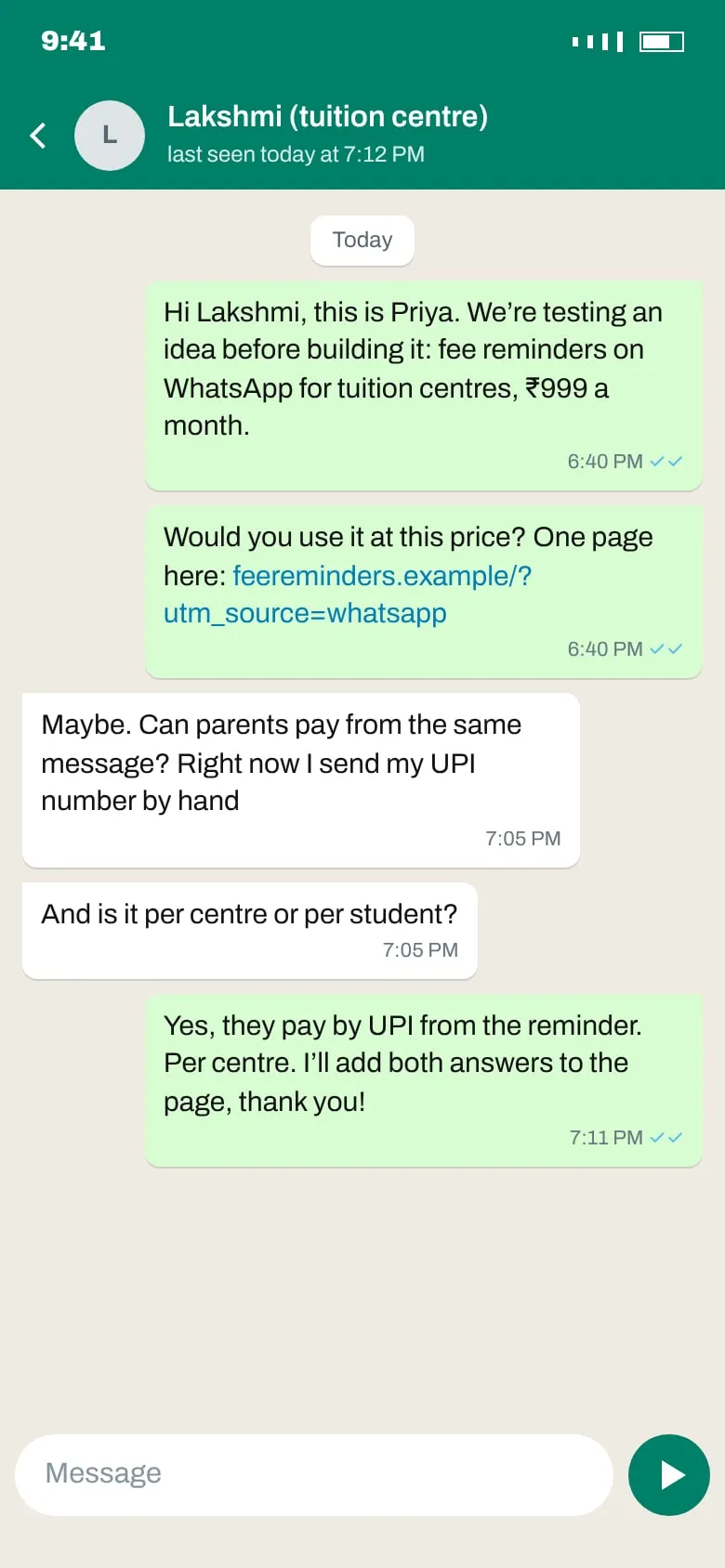
- Say you're testing before building, name the price and ask one question.
- Objections and questions: write every one down.
- Answer, then put the answer on the page so the next buyer doesn't have to ask.
Write down every objection you hear. Those lines become your FAQ, your next headline and your first product spec.
What to count, and when to decide
The guides that rank for this quote targets from “5% sign-ups is healthy” to “30% is strong”. They don’t agree, and none of them cites a source. With 200 visitors, a percentage moves a lot from one or two people anyway.
Count people instead, and set the target before you start. A simple rule we’d use:
| After two weeks | What to do |
|---|---|
| Enough paid deposits to cover your first month of work (often 10 or more) | Build the smallest version that delivers what you promised |
| A few deposits and lots of questions | Answer the questions on the page, change one thing, run one more week |
| Interest but no deposits | Test a lower price or a different buyer, not a better design |
| Silence | Check you reached the right people. If you did, drop it or rethink it |
When not to use a landing page
- When the buyer is a large company. One page won’t get through a procurement team. Talk to five buyers instead.
- When trust is the whole product, like health or money advice. A page from strangers asking for money may fail for reasons unrelated to your idea.
- When you can’t reach the buyers. If you don’t know where 50 of them are, finding them is the real first problem.
What it costs to do properly
The test itself can cost close to nothing. If you’d rather hand over the page, these are our starting prices:
| What you need | Starts at |
|---|---|
| A one-page site, fast on any phone, with WhatsApp and a payment link | ₹12,999, with a free sample homepage first |
| A marketing site of up to 8 pages with a CMS | ₹60,000 |
| The first version of the product, as a web app | ₹2,50,000 |
Prices are fixed after a written spec; the full list is on our services page.
For what to build after the test works, read what a startup should build first, and see projects we’ve shipped in our work.
If you have an idea and want a second opinion on the page before you send it out, tell us about it. We’ll reply within a working day.
Questions people ask
- How do I validate a startup idea with a landing page?
- Write one page that names the buyer, the problem, the price and one action (pay a refundable deposit, join a list or message you on WhatsApp). Send it to 50 to 100 people who have the problem, one by one. After two weeks, count how many named people took the action. If enough paid a deposit to cover your first month of work, build. If nobody did, change the buyer or the offer before you write code.
- What is a good conversion rate for a validation landing page?
- There isn't a reliable published number. The guides that rank for this quote rules of thumb from 2% to 30% for sign-ups, they disagree with each other, and none cites a source. With a few hundred visitors any percentage is noisy anyway. Set your own target before you start, in people: for example, ten paid deposits from your target buyers.
- Can I take pre-orders from India for an idea that doesn't exist yet?
- Yes, if you're honest about it. Say on the page that the product is in development, when you expect to deliver and that the deposit is fully refundable. Use a payment link from an Indian gateway, which accepts UPI and cards, and refund anyone who asks.
- Do I need a developer to make a validation landing page?
- No. A no-code page builder, a payment link and a WhatsApp link are enough for the first test. A developer helps when you want the page fast on slow phones, set up to rank in search, or connected to a waitlist or your own analytics.
- How much does a landing page cost in India?
- With us, a one-page site starts at ₹12,999 with a free sample homepage first, and a marketing site of up to 8 pages starts at ₹60,000. Hosting on Cloudflare's free plan costs nothing for most test pages.
Keep reading
All notes →- Side projects developers can launch in 2027: small tools for people you can actually reachSix side project ideas for developers in 2027, built for buyers you can walk up to: shops, tuition centres, clinics, print shops and trusts. With the free-tier maths on Cloudflare Workers and D1, and what we learned shipping Redlyn and Fatura.
- Startup ideas to work on in 2027: six openings created by real deadlines and platform changesSix startup ideas for 2027, each tied to a rule or platform change you can check yourself: who pays, why now, what the first version needs, what it costs to build in India, and how to test it in two weeks.
- Website development for Bengaluru startups: what to build first, and what it costsHiring a website development company in Bengaluru for a startup? What to build at each stage, marketing site vs web app, which stack to pick, what it costs and a brief you can copy.